Why Choose FloppyData?
FloppyData is a modern and reliable proxy service offering a wide range of IP addresses with support for various protocols: HTTP, HTTPS, and SOCKS5. We continuously update our IP pool to provide stable and fast connections, enabling you to comfortably handle tasks ranging from social media management to marketing campaigns and automation.
FloppyData’s proxies help bypass geo-restrictions, maintain anonymity, and protect accounts from bans. The company focuses on easy integration and accessibility, offering competitive pricing and quality support.
Benefits of Using FloppyData Proxies with Paraturbo
- Speed and Stability: Our proxies provide fast and reliable connections without interruptions.
- Bypass Geo-Restrictions: Servers worldwide allow you to select the IP location you need.
- Full Compatibility: FloppyData fully supports all proxy types used by Paraturbo (HTTP, HTTPS, SOCKS5).
- Privacy and Security: Together with Paraturbo, our proxies ensure high privacy levels and protect your data.
- Cost-Effective: We offer optimal pricing so you can save money without compromising quality.
Configure FloppyData Proxies in Paraturbo
- Get your proxy details from FloppyData
- Log in to your FloppyData account.
- Navigate to the Create Proxy Pool section.

- Choose proxy type (residential, mobile, or datacenter), your desired location, protocol (HTTP, HTTPS, or SOCKS5), and the number of proxies you need.

- Copy the proxy credentials: Host (IP address), Port, Username, and Password.

2. Open the Paraturbo anti-fingerprint browser and click the “Create Profile” button on the “Profiles” page

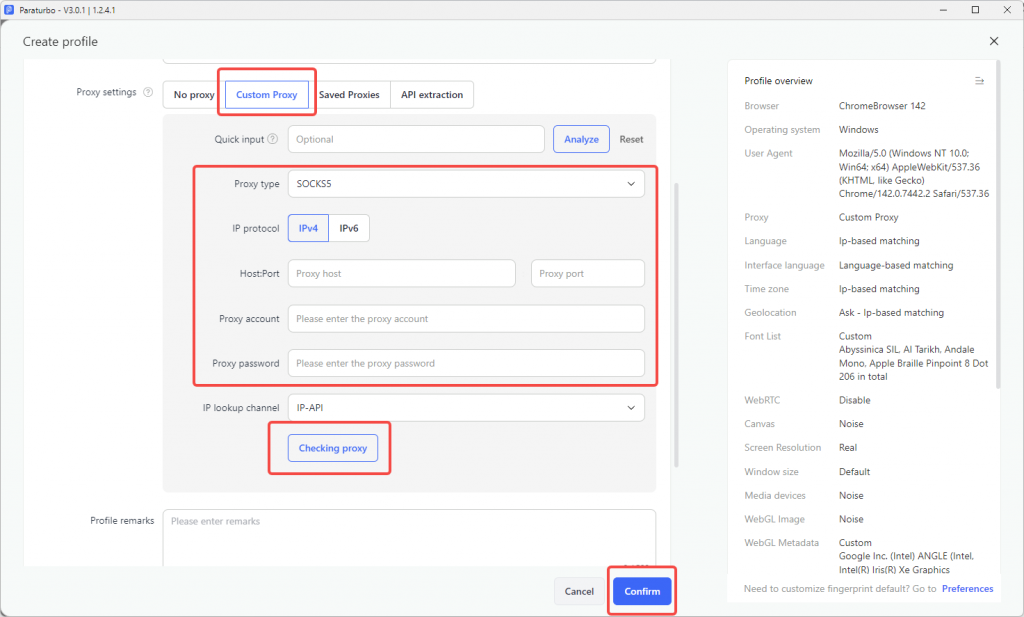
3. Then enter the profile name and other information, scroll down to the proxy setting module, select the proxy type: HTTP, and paste the proxy info you just copied into “Proxy host”. The proxy port, account and password will be automatically filled in. Click ” Check Proxy” and click “Confirm” when finished
4. Click the “Open” button to start using it.
